

Starting a blog is easy. Growing it is not.
Most new bloggers focus only on writing content — but the real difference between a hobby blog and a growing blog comes from using the right tools. If you’re using WordPress, plugins can completely transform your site’s performance, security, SEO, and user experience.
In this guide, we’ll cover the best WordPress plugins for new bloggers in 2026 — carefully selected to help you grow faster without overwhelming your website.
Why New Bloggers Need the Right WordPress Plugins
WordPress is powerful, but out of the box it’s basic. Plugins help you:
- Improve Google rankings
- Speed up your website
- Protect your blog from hackers
- Capture emails
- Track visitor behavior
- Improve design and user experience
However, one common mistake beginners make is installing too many plugins. The goal isn’t quantity – it’s strategy.
Let’s break down the essential WordPress plugins every beginner should consider.
1️. SEO Plugin – Your Traffic Foundation
If you want organic traffic, SEO is non-negotiable.
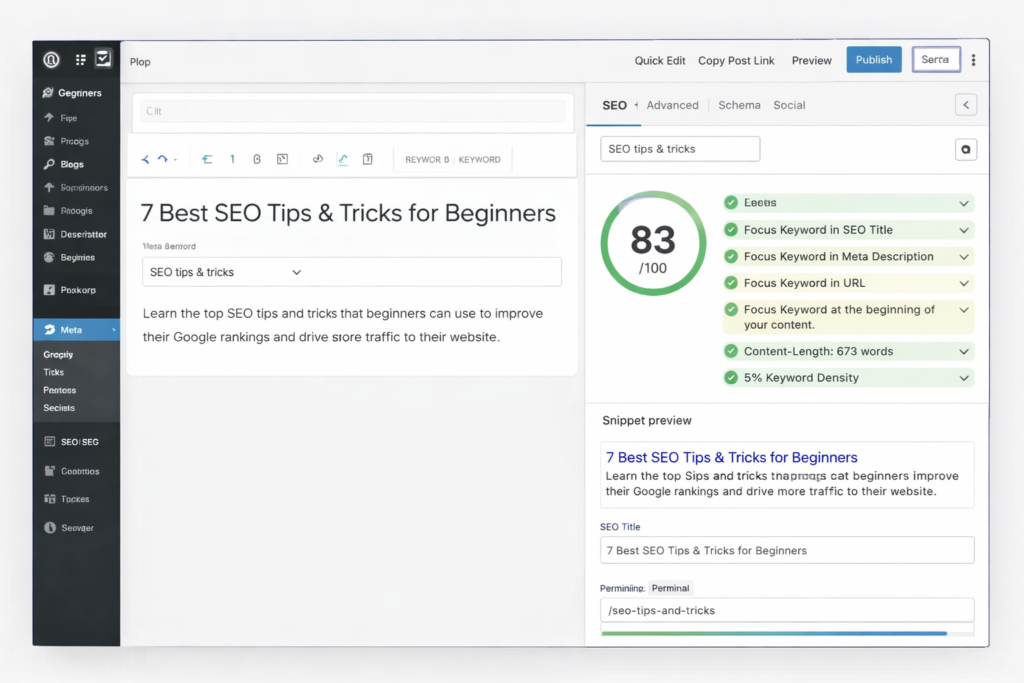
Recommended: Rank Math SEO
Rank Math is beginner-friendly and powerful. It helps optimize:
- Focus keywords
- Meta titles and descriptions
- XML sitemaps
- Schema markup
- Internal linking suggestions
For new bloggers, this plugin acts like a checklist before publishing. It ensures your content follows SEO best practices without technical knowledge.
If you’re serious about ranking on Google, this is one of the must have WordPress plugins for bloggers.
2️. Speed Optimization Plugin – Because Speed Affects Rankings
Google uses page speed as a ranking factor. Readers also leave slow websites quickly.
A speed optimization plugin helps:
- Enable caching
- Compress files
- Optimize CSS & JavaScript
- Lazy load images
- Improve Core Web Vitals
Recommended Options:
- WP Rocket (Premium)
- LiteSpeed Cache (Free, if hosting supports it)
For new bloggers, improving speed early prevents ranking issues later. A fast blog builds trust and reduces bounce rate.
3️. Security Plugin – Protect Your Hard Work
Even small blogs get attacked by bots.
Security plugins protect your site from:
- Malware
- Brute-force login attempts
- Spam attacks
- Suspicious activity
Recommended: Wordfence Security
It includes firewall protection and malware scanning. For WordPress beginners, security should never be ignored recovery from hacking is far more stressful than prevention.
This is truly an essential WordPress plugin.
4️. Backup Plugin – Your Emergency Plan
Imagine losing months of content due to server failure or hacking.
Without backup, recovery is difficult.
Recommended: UpdraftPlus
It allows you to:
- Automatically back up your files
- Store backups on Google Drive or Dropbox
- Restore your site in one click
New bloggers often forget this step — until something goes wrong.
Backup = peace of mind.
5️. Analytics Plugin – Understand What’s Working
You need data to grow.
Which blog posts get traffic?
Where are visitors coming from?
Which pages convert best?
Recommended: MonsterInsights
(or manually connect Google Analytics)
This plugin connects your analytics directly to your WordPress dashboard. For beginners, this removes technical complexity and makes growth tracking easier.
6️. Contact Form Plugin – Build Connections
If someone wants to:
- Collaborate
- Offer sponsorship
- Ask questions
- Hire you
They need a way to contact you.
Recommended:
- WPForms
- Contact Form 7
Keep your form simple: Name, Email, Message.
This small step makes your blog look professional and trustworthy.
7️. Image Optimization Plugin – Improve Performance
Images can slow down your blog if not optimized properly.
Recommended:
- Smush
- ShortPixel
These plugins compress images without losing quality. If you want to rank in Google Discover or improve mobile performance, image optimization matters.
8️. Page Builder – Design Without Coding
Design affects credibility.
A clean, modern layout increases time on site and improves user experience.
Recommended: Elementor
It allows you to:
- Create landing pages
- Design custom blog sections
- Add call-to-action blocks
- Build layouts visually
Since many new bloggers use Hello Elementor theme, this combination works perfectly.
Minimal Plugin Setup for Beginners
If you want a clean and optimized start, install only:
- SEO Plugin
- Speed Plugin
- Security Plugin
- Backup Plugin
- Analytics Plugin
- Contact Form
That’s enough to build a solid foundation.
You can expand later when traffic grows.
Common Mistakes New Bloggers Should Avoid
❌ Installing 20+ plugins immediately
❌ Using outdated plugins
❌ Downloading nulled premium plugins
❌ Ignoring updates
❌ Installing plugins with poor reviews
Before installing any plugin, check:
- Last updated date
- Active installations
- Ratings and reviews
- Compatibility with your WordPress version
Being selective keeps your website stable and professional.
Best Free WordPress Plugins for Blogs (Quick List)
If you’re starting with zero budget, here are free options:
- Rank Math (Free version is powerful)
- LiteSpeed Cache
- Wordfence (Free version available)
- UpdraftPlus (Free version available)
- Contact Form 7
- Smush
You don’t need to spend money immediately to build a quality blog.
Final Thoughts
Choosing the best WordPress plugins for new bloggers is about building smart systems from day one.
Plugins should help you:
✔ Rank higher
✔ Load faster
✔ Stay secure
✔ Track growth
✔ Build trust
At WebToolsyHub, we believe growth comes from smart tools – not from installing everything available.
Start small. Stay optimized. Focus on valuable content. Upgrade only when necessary.
That’s how new bloggers turn into professional creators.
Frequently Asked Questions
What plugins should a new blogger install first?
New bloggers should install SEO, speed optimization, security, backup, and analytics plugins first.
How many WordPress plugins should a beginner use?
Beginners should limit plugins to essential tools only, usually 6–10 quality plugins.
Are free WordPress plugins good enough?
Yes, many free plugins provide strong functionality. Premium tools may offer advanced features.